
Securing Ubuntu: Applying Critical Security Updates
𑇐 LAMP server 𑇐 Ubuntu 22.04 (Jammy) 𑇐 PHP 8.1 security package remediation
Tatiana Timonina
October 30th, 2026 𑇐 10 min read

Introduction
On 21 October 2026, DigitalOcean issued a critical security notification regarding two Remote Code Execution (RCE) vulnerabilities affecting PHP installations.
Reported vulnerabilities:
- CVE-2026-109618
- CVE-2026-109619
According to DigitalOcean’s notification, these vulnerabilities could let attackers execute arbitrary code on vulnerable PHP servers, potentially leading to unauthorized access, application compromise, or full server compromise.
The notification advised customers using PHP on DigitalOcean Droplets, LAMP stacks, WordPress installations, and other PHP-based environments to apply security updates immediately.
We identified our DigitalOcean-hosted LAMP server as potentially vulnerable to php2shell because it was running PHP 8.1 on Ubuntu 22.04 LTS (Jammy Jellyfish). This combination prompted us to investigate whether the server was exposed to the reported vulnerability and whether the installed PHP packages required a security update.
Official DigitalOcean security announcement:
Critical PHP RCE Vulnerabilities: Patch Now – DigitalOcean
Impact and Security Risks
The reported vulnerabilities could potentially result in:
- Remote execution of unauthorized code
- Unauthorized access to the web server
- Exposure of sensitive application or database information
- Website compromise or service disruption
- Potential compromise of the hosting environment
Because the server hosted PHP applications, we reviewed the installed PHP version.
1. Initial Investigation
We connected to the DigitalOcean Droplet via SSH and checked the installed PHP version.
php -vInitial output:
PHP 8.1.2-1ubuntu2.27 (cli)
Zend Engine v4.1.2
Zend OPcache v8.1.2-1ubuntu2.27
The server was running PHP package version 8.1.2-1ubuntu2.27.
PHP 8.1 had reached end of life under the upstream PHP support lifecycle. However, Ubuntu maintains its own security updates for supported operating system releases.
The next step was to check whether Ubuntu had published an updated PHP package.
2. Root Cause / Identified Issue
The installed PHP packages were older than the latest available Ubuntu security package versions.
Installed version: 8.1.2-1ubuntu2.27
Available version: 8.1.2-1ubuntu2.28
Ubuntu published security updates for PHP through its Ubuntu 22.04 repositories.
Official Ubuntu security advisory:
USN-8948-1: PHP vulnerabilities – Ubuntu
This advisory should be used to confirm the affected packages, applicable CVEs, and fixed versions.
No evidence of an actual server compromise was identified during the package-version investigation.
3. Solution Implemented
Step 1: Create a Snapshot on DigitalOcean
Before applying any PHP security updates, create a snapshot of the DigitalOcean Droplet so you can restore the server if any issues occur during the upgrade.
1. Log in to the DigitalOcean Control Panel.
2. Navigate to Droplets and select the affected server.
3. Open the Backups & Snapshots section.
4. Under Snapshots, select Take Snapshot.
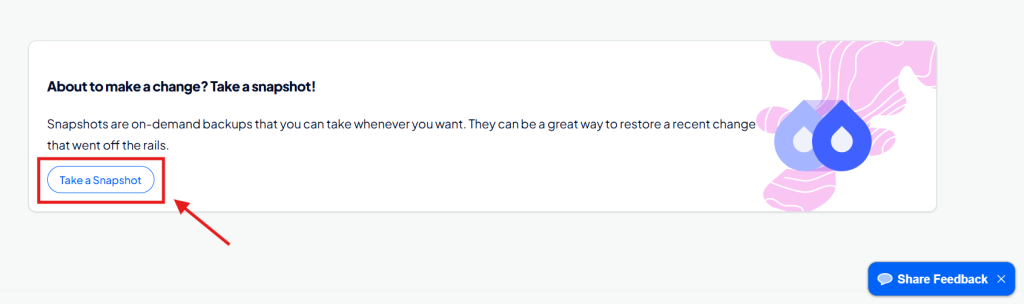
5. Enter a descriptive snapshot name, such as yourdroplet-before-php-security-update-2026-10-22.
6. Wait for the snapshot process to complete before proceeding with the PHP update.
Note: For a production server, consider powering off the Droplet before taking the snapshot to improve data consistency. Also back up important databases separately.
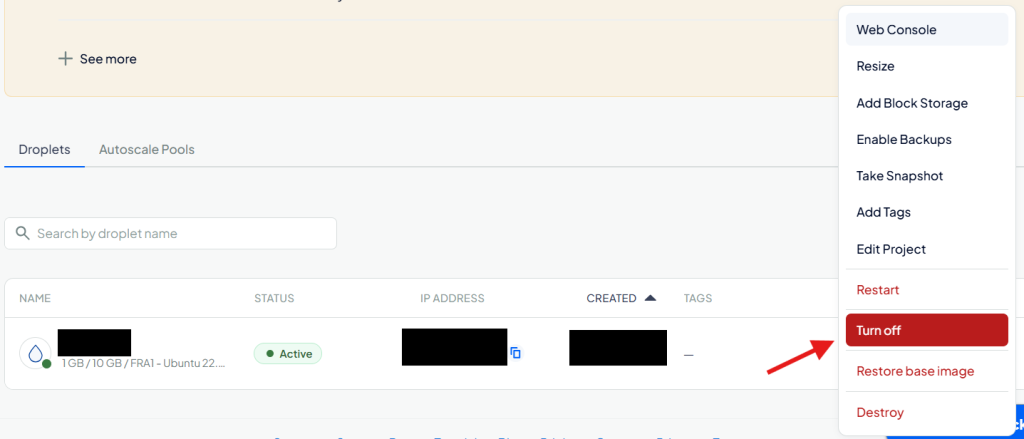
Outcome: A recovery point is available before applying the PHP security patches, allowing you to restore the server if the update causes unexpected issues.
Step 2: Refresh Ubuntu Package Information
Refreshed the package repository information:
sudo apt updateStep 3: Check Available PHP Security Updates
Executed:
apt policy php8.1-cli libapache2-mod-php8.1 php8.1-fpm
Results:
| PHP Component | Installed | Available |
| php8.1-cli | 8.1.2-1ubuntu2.27 | 8.1.2-1ubuntu2.28 |
| libapache2-mod-php8.1 | 8.1.2-1ubuntu2.27 | 8.1.2-1ubuntu2.28 |
| php8.1-fpm | Not installed | 8.1.2-1ubuntu2.28 |
The updated PHP packages were available from the Ubuntu Jammy security and updates repositories.
Step 4: Install PHP Security Updates
Upgraded the installed PHP 8.1 packages:
sudo apt install --only-upgrade 'php8.1*' libapache2-mod-php8.1During installation, Ubuntu prompted for permission to restart services using outdated libraries.
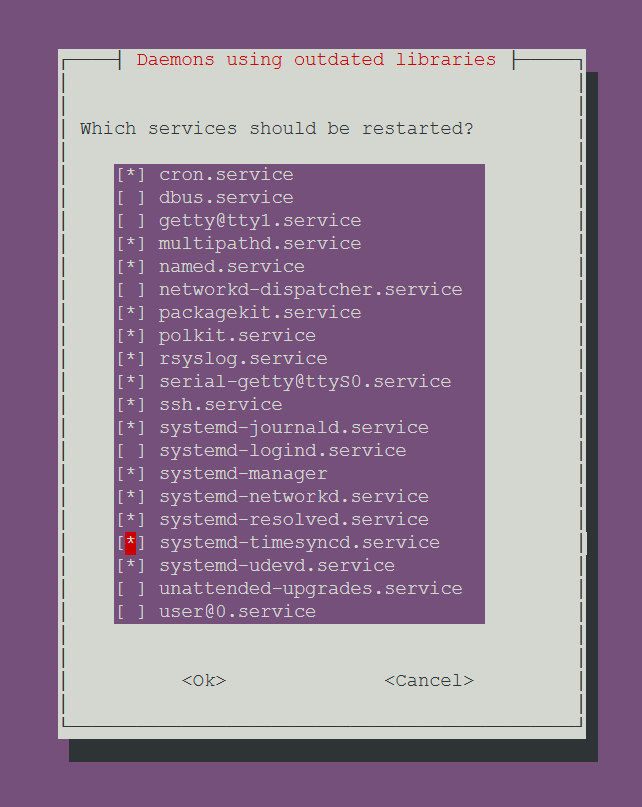
The package installation was completed.
Step 5: Validate Apache Configuration
Executed:
sudo apache2ctl configtestOutput:
AH00558: apache2: Could not reliably determine
the server's fully qualified domain name,
using 10.19.0.5.

Syntax OK
The Apache configuration validation passed.
The fully qualified domain name warning did not prevent Apache from operating.
Step 6: Restart Apache
Restarted Apache to load the updated PHP module:
sudo systemctl restart apache2Verified the Apache service:
sudo systemctl is-active apache2Result:
activeApache was confirmed to be running.
6. Post-Update Verification
Verify PHP CLI Version
Executed:
php -vOutput:
PHP 8.1.2-1ubuntu2.28 (cli)
Zend Engine v4.1.2
Zend OPcache v8.1.2-1ubuntu2.28
The PHP CLI package was successfully updated.
Verify Apache PHP Module
Executed:
dpkg -l | grep libapache2-mod-php8.1Output:
ii libapache2-mod-php8.1 8.1.2-1ubuntu2.28 amd64The Apache PHP module also updated successfully.
Verification Summary
| Verification | Result |
| PHP CLI update | Passed |
| Apache PHP module update | Passed |
| Apache configuration validation | Passed |
| Apache service status | Active |
| Website functionality | Not documented |
| CVE-specific patch verification | Confirm against Ubuntu advisory |
7. Resolution Summary
The DigitalOcean LAMP server’s PHP packages were successfully upgraded.
Before:
PHP 8.1.2-1ubuntu2.27
After:
PHP 8.1.2-1ubuntu2.28
Both the PHP CLI and Apache PHP module were updated to the latest available Ubuntu package version identified during remediation.
Apache configuration validation passed, and the Apache service was confirmed operational.
Ubuntu can backport security fixes into older upstream PHP versions. Therefore, the installed PHP version does not necessarily need to change to PHP 8.4 to receive a specific Ubuntu security fix.
The exact CVE remediation status should be established using the Ubuntu security advisory and package changelog.
8. Preventive Measures and Recommendations
To reduce the likelihood of similar security exposure:
- Regularly review and install Ubuntu security updates.
- Monitor DigitalOcean and Ubuntu security announcements.
- Maintain verified backups before applying security patches.
- Review installed PHP versions and extensions periodically.
- Plan an upgrade from PHP 8.1 to a currently supported upstream PHP version, such as PHP 8.4.
- Test website and application functionality after applying updates.
- Monitor server logs for suspicious activity.
9. Official References
1. DigitalOcean – Security Announcement
Critical PHP RCE Vulnerabilities: Patch Now
DigitalOcean’s security announcement concerning the reported PHP remote code execution vulnerabilities.
2. Ubuntu – Security Advisory
USN-8948-1: PHP vulnerabilities
Ubuntu’s security notice for the PHP vulnerabilities and associated package updates.
3. PHP – Official Security Releases
Official PHP release announcements and upstream security update information.
10. Final Status
PHP Package Update: Completed
The server was successfully updated from 8.1.2-1ubuntu2.27 to 8.1.2-1ubuntu2.28.
Both the PHP CLI and Apache PHP module were verified at the updated package version.
Apache remained operational after the update.
The remaining recommended actions are to confirm CVE-specific remediation against Ubuntu’s security notice, test hosted application functionality, and plan a future migration to a supported PHP release.
Outcome: The outdated PHP packages were updated successfully, improving the security posture of the DigitalOcean LAMP environment.